 0
0 0
0 0
0 0
0 0
0 0
0


My friends will tell you that I am a tech gadget floozy. Basically that means I will sell my last piece of bread for the latest tech gadget. I usually have the latest phone or whatever is hot at the moment. Believe it or not though I was tabletless for a long time and I am ashamed to admit it, but I whined about it, a lot. I hated not having a tablet and being without an amazing tech gadget that everyone enjoyed. Then about a week before my birthday last month I had a chance to get a Nook on easy payments. I was so excited because I finally had a tablet but that was short lived. I couldn’t get it to connect to my internet and after some research I found that it was my router. So I had to go fork out more money for a router and then it would connect but I couldn’t keep it connected enough to watch my shows or videos. Hello!! That was the whole reason I wanted one! It was a complete nightmare but I was determined to keep it because, well, it was a tablet and I wanted one. Then, someone very special to me surprised me with a Kindle Fire. WOW! The nook went back faster than you can say “Refund” and I settled in as a brand new Kindle Fire owner. YAY ME! Well, not at first, let me explain.
Kindle Fire- Learning the Ropes
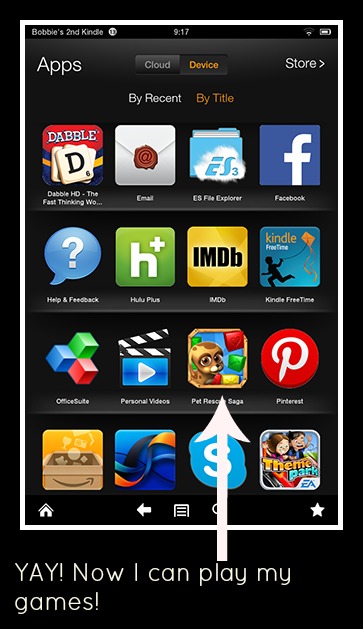
I wasn’t happy to find out that I couldn’t download a lot of my favorite apps to my fire. Especially Candy Crush and Pet Rescue. I am used to Android and Google Play, which has thousands of apps. Also, my daughter has an iPad mini that she would let me borrow and it has every app you could ever want. The kindle’s app store was very frustrating at first. But I am not one to give up, so I took to the internet and researched apps and found that the Kindle Fire really does have a lot to offer and it could become a beloved tech gadget if I just kept looking. Now you can’t pry it from my fingers. I constantly have it around and use it for just about everything when I am away from my computer. It really is an awesome little machine! Here are some of the things I have learned so far :
- If you are an Amazon Prime Member you have a lot of free content at your fingertips. I love the borrowing books feature, I just wish you could borrow more than one. You can also rent movies and buy full seasons of your favorite TV shows. It is so awesome to be able to rent/own my favorite movies right from Kindle and the instant streaming of free content is just icing on the cake!
- Amazon wants only apps that are proven to work with the kindle in their app store. I can totally understand that and it makes for a better experience. However, that does not mean you can’t download other apps from Google Play, etc. onto your Kindle Fire. I added a flash player by using this flash player tutorial and then learned how to upload my own apps to my kindle fire by using this tutorial . ( I have to note that you are adding apps at your own risk. Just because it worked for me does not mean it will work for you. Be careful)
- You can get free books from the amazon store. I know that you can do this on all your kindles but for some reason it just seems more fun on the fire. Maybe it is the vivid colors, I don’t know. I like to know what books are available and sometimes they have flash sales where you can get books for free or .99 cents. I needed to find out how to stay up to date so I found these three websites; E-reader IQ, Ereader News Today, Book Gorilla.
- I am pretty much a huge fan of Facebook so of course I wanted to be social about my kindle fire, so I researched and found pages that were dedicated to the kindle fire. Booklending.com Facebook page has daily deals, cute meme’s about reading and up to information about books. You can find all there is to know about the kindle fire over at the official kindle fire facebook page. Learn more about Amazon apps HERE.
Like with any new tech gadget you get, it took me a bit too get used too how it worked. But now I love it! I highly recommend it if you are looking for a cute little tablet to use in bed at night or on vacation. As promised, here are my top apps I have been using from the Amazon app store! I have linked them so you can go and read about them at your liesure.
Top Kindle Fire Apps
- Easy Installer (free)
- Evernote (free)
- Flipboard (free)
- Hulu Plus (free)
- Officesuite Professional 7 (14.99)
- Pocket (free)
- StumbleUpon (free)
- Tumblr (free)
- Words with Friends (free)
- Comics by comiXology (free)
- GoodReads (free)
- Scope (free)
- Cozi Family Organizer (free)
- Minecraft ( $6.99)
- Fandango (free)
- Wifi Analyzer (free)
- Wikidroid for Wikipedia (free)
- AVG Anitvirus Free (free)
- Drop Box (free)
- Dinner Dash (free)
- Freedi YouTube Downloader (free)
- HBO Go (free, but you must have an HBO subscription through your cable or satellite provider)
- Spotify (free)
- Flipboard (free)
- Amazon Student (free)
- Theme Park (free)
- Dabble ($1.99)
- TNT ( free)
- Vevo (free)
- ES3 (free)
[box type=info]You all know I love QVC and I just found out that QVC has the Kindle Fire 8.9 HD (32 gb) complete with charger and case for 6 easy payments of $58.16. The offer is only good until August 11, 2013! Get more info HERE. [/box]


Leave a Reply